

The answer that almost no one wants to hear: less than what you want. Translating is a specific cost; maintaining is a monthly cost, and that asymmetry is what sinks most ambitious multilanguage projects.
The good thing is that the decision does not have to be made by intuition. Your own data is already telling you which languages to translate into, and it's three clicks away.
To the point: two well-served languages yield more than five half-done ones, and the difference is noticeable in the bounce rate rather than in billing. Start with one, time it three months, and add the next only when the first is working.
Step 1: See where your visitors are coming from now
The most honest signal of real demand is the one you already have.
- In Google Analytics, open the report demographic data by country of the last 12 months.
- Also see the report browser language: it is more reliable than the country, because a German on vacation in Spain still has the navigator in German.
- Write down the top five on each list, with their percentage of sessions.
What you are looking for is not absolute volume: it is unexpected volume. If 4% of your visits already come from the Netherlands without you having done anything in Dutch, that is demand that is arriving despite the barrier, not thanks to anything.
Step 2: See what language they search for you in
Search Console is even more direct, because it shows you the queries.
- Open Performance and set the range to 12 months.
- Filter by país and look at impressions, not clicks: impressions are demand; The clicks are already a result.
- Go back to queries and search for terms that are not in your language. If you appear for searches in English without having content in English, you have a very clear signal.
- Look at the middle position of those terms. Positions 30-80 with impressions mean that Google already considers you relevant and you are just missing the right page.
Advice: The best candidate for a second language is almost never “the language with the most speakers in the world.” Is the one in which you already have impressions without having done anything. That demand already exists, it already finds you and it already ignores you for not being able to read you. Converting it is much cheaper than creating new demand from scratch.
Step 3: Calculate what it costs to maintain each language
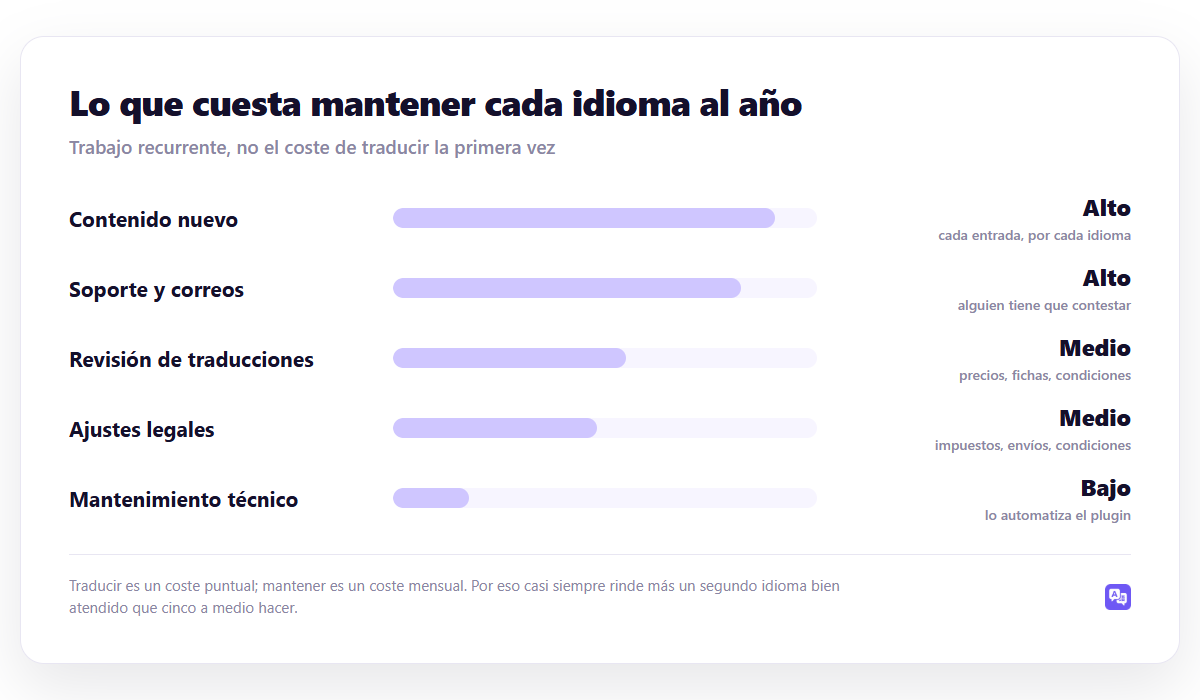
The classic mistake is to budget for the initial translation and forget the rest. Each active language brings, every month:
- New content. Every entry you publish, multiplied by the languages. If you publish four a month and you have three languages, that's twelve pieces.
- Medium. Someone has to answer the emails that arrive in that language. This is the cost that is most underestimated.
- Revision. Prices, product sheets, conditions: they change, and must be updated in all languages.
- Legal adjustments. Taxes, shipping times, return conditions. Selling in Germany is not translating the website: it is complying with German regulations.
- Technical maintenance. This is automated by the plugin, and it is the cheapest of all.
Ojo: If you sell, the most expensive language is not the most difficult to translate: it is the one whose mercado It forces you to do more. Customer service during local hours, returns, billing with VAT, and a payment method that is normal there. Translating the website is the easy and cheapest part of entering a country.
Step 4: Decide with this rule
| Your situation | Recommended languages | Because |
|---|---|---|
| Local services website | 1, sometimes 2 | If you don't attend outside, translating doesn't change anything |
| Blog or media with traffic | 2-3 | The content scales well; support does not exist |
| SaaS or digital product | 2-4 | English almost mandatory; the rest by demand |
| Store that ships to Europe | 2-3 at the beginning | Each country adds regulations, not just text |
| Documentation or help | As many as users | No language support to maintain |
The difference between the last row and the others is the key to the calculation: the cost is not in the words, it is in the people. Documentation translated into fifteen languages does not generate recurring work. A store in fifteen languages, yes.
Step 5: Start for less than you think
The sequence that works:
- A new language. The one that comes out of steps 1 and 2.
- Only the pages that sell. Home, services or products, prices, contact. The blog can wait.
- Three months of data. See impressions, clicks, and conversions for that language in Search Console and Analytics.
- Decide. If it works, complete that language—blog included—before adding another. If it doesn't work, don't add more: find out why.
The mistake that is repeated is skipping point 3. Five languages are translated at the same time, none of them are well served, and when the numbers don't work out there is no way to know which of the five had potential.
The case when this logic does not apply
All of the above assumes that translating costs time and money per language. If your marginal cost per language is almost zero – massive automatic translation, content that does not generate support, without legal implications – the account changes: there it may make sense to cover many languages and let the data tell you which ones deserve human review.
It is the approach of WP-Translate: you translate the entire site at once, each piece is marked as pending review, and after three months you see in Search Console which languages are bringing impressions. Those are the ones you check by hand; the others are still there without costing you any work.
It flips the usual order: instead of choosing languages and then translating, you translate and then let the data choose. With one-time payment —€89, €169 or €289 depending on the number of sites—adding one more language does not change the bill. You can try it with the free version.
Even so, the warning at the beginning still stands: If a language generates emails that no one can answer, it is a liability even if translating it were free. Automation cheapens text, not attention.
What to watch after three months
For each language you have activated:
- Impressions in Search Console filtering for that country. It is the earliest signal: it appears before the clicks.
- Middle position. If you are in 60th place after three months, you are doing well: it means that you have entered the index and are climbing.
- bounce rate of that language versus that of your primary language. If it is much higher, there is something untranslated: menu, buttons or forms. The list of places to look is at 9 multilingual SEO mistakes.
- Real queries. If the ones that bring traffic are branded, you are not yet competing; If they are generic, yes.
The complete route to assemble it well is in the guide. WordPress multilanguage, and the breakdown of costs in how much does it cost to translate a WordPress website.
Frequently asked questions
Is English always worth it?
Almost always, but not by English speakers: by all those who search in English without being English. In digital products and documentation it is practically mandatory. In local services, nothing changes.
Can I remove a language if it doesn't work?
You can, but do it right: redirect their 301 URLs to the primary language equivalents. If you leave them giving 404, you lose the links that would have pointed there.
How many languages are too many?
There is no number. The correct question is whether you can handle the emails that arrive in each one. If the answer is no, that language is unnecessary no matter how many visitors it brings.
Do I translate into American Spanish in addition to Spanish?
Only if prices, currency, shipping or conditions change. If the content is going to be identical, a single Spanish is suitable for both markets and you save on maintaining twice as much. It is explained in duplicate content and multilingual website.
Continue reading
This piece is part of the guide WordPress multilanguage, where the complete tour is: URL structure, plugin choice, automatic translation, SEO and budget.
- hreflang con Yoast SEO — what it really covers and what you have to complete
- duplicate content on multilingual websites — when Google doesn't penalize you and when it does
- multilingual SEO errors — 9 multilingual SEO mistakes that sink a website (and how to detect them today)