

There are more than twenty translation plugins in the WordPress repository and almost all of them work. The problem is not finding one that translates: it is finding one that fits who is going to write, how much content do you have and what budget do you have for three years?.
This comparison is ordered by that criterion, not by popularity. At the end there is a table and a decision rule in four questions.
To the point: There is no “best translation plugin”. There is the one that solves your bottleneck. If you have translators, your problem is management; If you don't have them, it's the volume; If you're just starting out, it's the price. Identify which of the three is yours before reading the list.
The best plugin to translate WordPress, according to your case
| What you need | The best for that | Price |
|---|---|---|
| Free and unlimited languages | Polylang | Free; Pro, €99 per year |
| Translate viewing the page | TranslatePress | Free with 1 language; from €99 per year |
| Keep nothing | Weglot | Subscription by words |
| Translator and approval team | WPML | From €39 per year |
| Lots of content, automatic translation included and no subscription | WP-Translate | Free; Pro, single payment from €89 |
Below you have each one in depth, with where it fits and where it doesn't. Updated November 2026.
How have we compared
Four criteria, in this order of weight:
- Does it only translate or does it only organize? It is the difference that determines the most decisions. Some plugins give you the structure and expect you to write each language; others come with automatic translation as standard.
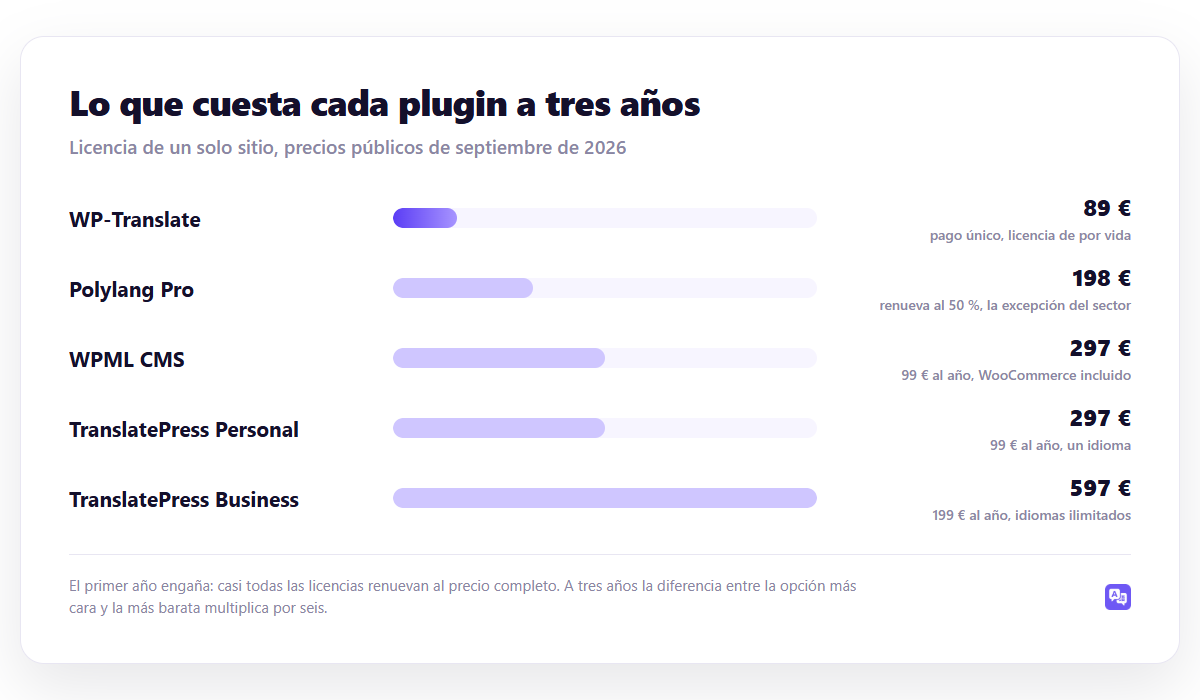
- Price for three years, not one. Almost all licenses renew at full price, and the first year is deceiving.
- SEO real. That generates its own URLs per language, reciprocal hreflang and sitemap with all languages. Without this there is no new positioning.
- Whose translations are they? Whether they live in your database or on a third-party server.
1. WPML — the management standard
It has been the reference plugin for more than a decade and continues to be the most complete option when there are people translating. It sends jobs in batches, distributes them among translators or agencies, each piece goes through review states, and when you edit the original it marks the translation as outdated.
A favor: Tested compatibility with almost any theme or plugin, WooCommerce included from the CMS plan, serious translation manager.
Against: It does not have a free version, the initial configuration is dense and the automatic translation is charged for credits apart from the license.
Precio: €39, 99 or €199 per year. The €39 plan does not include WooCommerce or the manager.
2. Polylang — the best free
800,000 active installations and 4.7 out of 5. Declares the language as a native WordPress taxonomy, so each translation is a normal entry: the database remains standard and is the lightest architecture in the sector.
A favor: Free with unlimited languages, unbeatable performance, 50% renewal in the Pro version - the exception in the sector.
Against: organizes, but does not translate. You write each piece. WooCommerce needs payment plugin and theme strings require Loco Translate apart.
Precio: gratuitous; Pro from €99 for the first year, €49 for renewal.
3. TranslatePress — translate by viewing the page
Its proposal is visual: you open your website in an editor and click on any text to translate it, whether generated by the theme, a plugin or your content. It solves very well the problem of loose texts that remain in Spanish.
A favor: translates everything visible no matter where it comes from; ideal for themes with a lot of layout and forms.
Against: The free version only allows one additional language, and with three hundred entries translating page by page is a long job.
Precio: free with one language; €99 or €199 per year. Compared in detail in WPML vs TranslatePress.
4. Weglot — zero maintenance
Translate and host on its infrastructure. It sets up in minutes, works well, and virtually doesn't touch your server. It is the option of those who prefer to pay for not taking care of themselves.
A favor: Very fast startup, correct quality, does not add burden to your WordPress.
Against: the price rises with words and languages, and your translations don't live in your database. If you stop paying, they disappear.
Precio: by volume of words. Analyzed in Weglot vs WPML and in Polylang vs Weglot.
5. GTranslate — with an important caveat
900,000 installations, but you have to understand what its free version does: it translates on the fly in the browser and it doesn't save anything. There are no URLs per language with your own content, so you will not position yourself in any new market.
It helps a foreign visitor understand your website. It is not useful for getting new visitors from Google. Their payment plans do generate indexable URLs, and there the proposal changes completely. Developed in GTranslate vs WPML.
6. Loco Translate — the companion piece
It is not a multilanguage plugin: it is an editor of the language files of themes and plugins. It does not create versions of your content or URLs by language. What it does—translate the strings that come from the code—it does very well and for free.
It makes this list because it is Polylang's usual partner, and because many people install it expecting it to translate their entries. It doesn't. The correct use is in how to translate a WordPress plugin.
7. WP-Translate — for the volume problem
WP-Translate It attacks the bottleneck that none of the above completely solves: that translating is a job that someone has to do piece by piece.
Launch the translation of the entire site at once, with several AI engines included - without opening a DeepL account or managing keys -, mark each piece as pending review and save everything in your database, with its URL per language and its hreflang. It also translates theme and plugin strings, so you don't need a separate Loco Translate, and includes WooCommerce with no added plugin.
Precio: €89, €169 or €289 in one-time payment depending on the number of sites, with a lifetime license. There is free version to test it on your own website.
Where it doesn't fit: If each language on your website has different handwritten content, mass translation does not give you anything and Polylang is a better option.
| Plugin | Free | It only translates | Your data | 3 years |
|---|---|---|---|---|
| WPML | No | Yes, separate credits | Yes | 117 / 297 / 597 € |
| Polylang | Yes, unlimited | No | Yes | 0 / 198 € |
| TranslatePress | 1 language | Yes, for words | Yes | 297 / 597 € |
| Weglot | Trial | Yes | No | Variable |
| GTranslate | Unsaved | Yes | According to plan | Subscription |
| Loco Translate | Yes | No | Yes | €0 |
| WP-Translate | Yes | Yes, the whole site | Yes | 89 / 169 / 289 € single |
Ojo: The most misunderstood row is “your data.” It is not a technical detail: decide what happens the day you stop paying. With the options saved in your database, uninstalling the plugin leaves you with the translations even if you lose the structure. With those that host outside, the website returns to a single language.
Which one to choose, in four questions
- Who is going to write each language? If anyone, Polylang or WPML. If there is no one, you need a serial translation.
- How many pieces do you have? Count posts, pages and products, and multiply by languages. Below fifty, almost anything will do; above two hundred, translating by hand stops working.
- Do you sell with WooCommerce? Check if it is included or if it is another license.
- How much does it cost in three years? Add renovations. The difference between the first year and the third changes the order of the list.
Advice: Before you buy anything, do a ten minute test: Automatically translate your five most trafficked pages and read them. If quality is worth it, your problem is volume and the solution is mass translation. If it doesn't work for you, your problem is quality and you need someone writing. That test rules out half the list.
What to look for after installing
Choosing a plugin is half the job. The other half is checking that what it generates is correct: that the hreflang con Yoast SEO it comes out reciprocal, that the URL by language They have the structure you have chosen and that the sitemap lists all the languages. The checklist is in 9 multilingual SEO mistakes.
Frequently asked questions
What is the best free translation plugin?
Polylang, if you write each language. If you need me to translate alone, see the options at free translation plugins, where is the exact limit of each free version.
Can I use two translation plugins at the same time?
Two multilingual, no: they manage URLs and step on each other. A multi-language plus Loco Translate for the theme strings, yes, and it is a very common combination.
Do they affect performance?
Something, but less than what is said. We measure it with method in Does a translation plugin slow down your website?.
What if I already have one and want to change?
You can, but the risk is not in the content: it is in the URLs. The safe procedure is in how to migrate without losing translations.
How many languages should I activate?
Less than you want. The decision with data is in how many languages should your website have.
Continue reading
If you are still deciding how to set up the multi-language part, start with the multilingual WordPress guide: URL structure, SEO and budget, before choosing a tool.
- translate WordPress without plugin — the 4 ways and when it really pays off
- free translation plugins — what they give you and where is the limit
- why Google doesn't index your translations — 8 causes and how to fix them
- translate categories and tags — How to translate categories and tags in WordPress (and also their URLs)
- the comparison between Polylang and Weglot — full control or zero maintenance
- Search Console on a multilingual website — how to set it up and what to watch
- translate custom fields with ACF — How to translate custom fields (ACF) in WordPress
- 301 redirects on multilingual websites — the guide that avoids losing traffic
- multi-language internal linking — the error that breaks SEO
- traducir custom post types — How to translate custom post types in WordPress step by step
- machine translation vs. professional translator — when to pay a human
- multi-language structured data — the schema that Google understands
- the internal multilingual search engine — that you find in the language of each visit
- multilingual legal and cookie notices — Cookies, legal notice and RGPD on a multilingual website
- alternatives to WPML — six options with the cost of each one for three years
- how much does a website cost in two languages — real prices and an example with numbers