

A poorly set up multilingual website does not give errors, does not look broken and does not warn of anything. It just doesn't bring traffic. That's why these nine bugs survive for years on otherwise well-kept websites: there are no symptoms, just a number that doesn't go up.
Each one carries his verification. You can visit them today on your own website, in a while.
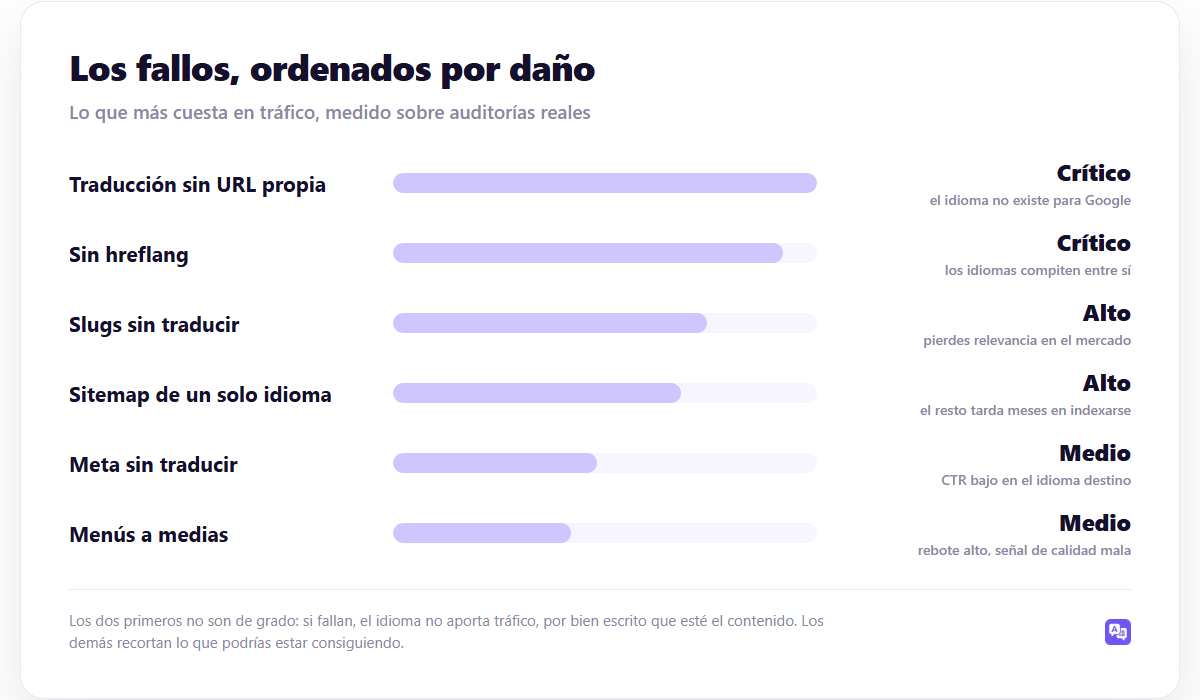
To the point: the first two are not a matter of degree: if they fail, that language does not bring traffic, no matter how well written the content is. The other seven cut into what you could be getting. Start at the top.
1. The translation does not have its own URL
What's happening: you use a translator that works in the visitor's browser. There is no address with translated content served from your domain, so Google has nothing to crawl.
How to check it: open the translated version, press Ctrl+U and look for a translated phrase in the source code. If it is not there and is only seen on the screen, it is generated by JavaScript and is not indexable.
Arrangement: switch to a solution that saves translations. It is developed in GTranslate vs WPML.
2. Missing hreflang tags
What's happening: Google does not know that your Spanish page and your English page are the same. Instead of joining, compete with each other for the same queries. It is the most expensive and most invisible failure.
How to check it: Ctrl+U on a page and search hreflang. One line must appear per translated language, plus x-default. Repeat on one page of each type: cover, post, static page, and category file.
Arrangement: It is provided by the multilanguage plugin, not Yoast. It is the most widespread misunderstanding and we explain it in hreflang con Yoast SEO.
3. Hreflang is not reciprocal
What's happening: Your Spanish page declares the English one, but the English one does not declare the Spanish one. Google ignores the entire statement. This is what almost always happens when someone inserts the labels by hand.
How to check it: open the two versions and compare their hreflang blocks. They have to be identical.
Arrangement: let the plugin generate it. Handheld does not hold up beyond five pages.
4. URL slugs remain in the original language
What's happening: your website in English has addresses like /en/nuestros-servicios/. The URL is a signal of relevance, and you are giving it up right in the market you want to win.
How to check it: look at five URLs of your translated version. Are they in the correct language?
Arrangement: translate the slugs. Almost all plugins cover it only in their paid versions. Do it before for those pages to be indexed: changing them later requires redirecting one by one.
Ojo: If you already have indexed URLs and need to change the slugs, mount 301 redirect before saving change, not after. Between the change and the redirect there is a window where Google hits 404s, and those days cost positions that take weeks to return.
5. The sitemap only lists one language
What's happening: The other versions end up being indexed the same, but months later, because Google has to discover them by crawling links instead of receiving the list.
How to check it: open tudominio.com/sitemap_index.xml and see if URLs for all languages appear.
Arrangement: in sitemap by language in WordPress.
6. Titles and meta descriptions are not translated
What's happening: Your English page is shown on Google with the title in Spanish. You can position, but no one clicks. It's a silent CTR loss that doesn't show up in any bug reports.
How to check it: search on Google site:tudominio.com/en/ and see what titles come out.
Arrangement: translate Yoast fields by language. The plugin provides the structure, but the texts must be written or translated. We cover it in multilingual metadata.
7. Untranslated menus, buttons and forms
What's happening: The content is in German and the menu in Spanish. The visitor does not understand where they are, they leave, and the high bounce rate is a quality signal that Google does use.
How to check it: Browse your own website in the translated language as if you were a client. Look at the menu, the footer, the buttons, a form, and the cookie notice.
Arrangement: It depends on where the texts are. For menus and theme, this guide; for plugin chains, this other one; for forms, the forms.
8. Automatic redirection by browser language
What's happening: you detect the browser's language and redirect without asking. It sounds good and has two bad effects: the Google crawler, which navigates with the American language, can end up always seeing the same version; and the visitor who wants to read in the original language cannot.
How to check it: Sign in with a VPN or change your browser language and see if you can go back to the original version.
Arrangement: suggest instead of redirect—a discreet notice with “Do you prefer to read in Spanish?”—and always leave a selector visible. We see it in language detection and automatic redirection.
9. Same content served by two routes
What's happening: /precios/ y /es/precios/ They return the same. This is truly duplicate content, and Google chooses one of the two, not always the one you would want.
How to check it: Try three URLs with and without the default language prefix. If both return 200, there is a problem.
Arrangement: a 301 redirect that removes the leftover variant. More context at duplicate content and multilingual website.
Advice: do this review once a quarter, not only when setting up the website. Bugs 5, 6 and 7 reappear on their own: you install a new plugin that includes untranslated texts, you publish posts whose metadata no one translated, you change the menu. One hour every three months keeps the multilingual healthy.
The review, in a list
| # | Failed | Verification | Damage |
|---|---|---|---|
| 1 | Translation without own URL | Ctrl+U and search for translated phrase | Critical |
| 2 | Syn hreflang | Ctrl+U and search for “hreflang” | Critical |
| 3 | Hreflang not reciprocal | Compare the two versions | Critical |
| 4 | Untranslated slugs | View 5 translated URLs | Alto |
| 5 | Sitemap incompleto | Abrir sitemap_index.xml | Alto |
| 6 | Goal without translating | site:tudominio.com/en/ | Media |
| 7 | Half menus | Browse as a customer | Media |
| 8 | Forced redirect | Try VPN | Media |
| 9 | Two routes, one content | Try with and without prefix | Media |
How many of these resolve themselves?
Seven of the nine are configuration, not content: either the plugin puts them in or no one puts them in. That's why choosing the tool matters more than it seems.
WP-Translate covers 1, 2, 3, 5 and 9 as standard: own URL per language, reciprocal hreflang with x-default —declaring only the languages with real translation—, sitemap with all languages and a single route per page. It also translates the Yoast fields (number 6) and the theme and plugin strings (number 7), which is what is usually left out. Has free version to check it on your own website.
The complete context, in the guide WordPress multilanguage.
Frequently asked questions
In what order do I arrange them?
By the number. 1 and 2 first of all: without them, fixing the others doesn't change anything because that language is not competing.
How long does it take to be noticed?
Between weeks and a couple of months, depending on how much Google tracks you. Hreflang and sitemap changes are picked up before content changes.
Do I need paid tools to audit this?
No. The nine checks are done with the browser and with Search Console, both of which are free.
My website only has two languages, does the same apply?
Yes, whole. With two languages, errors 2 and 3 are exactly the same serious: two versions competing with each other do the same damage as ten.
Continue reading
This piece is part of the guide WordPress multilanguage, where the complete tour is: URL structure, plugin choice, automatic translation, SEO and budget.
- hreflang con Yoast SEO — what it really covers and what you have to complete
- duplicate content on multilingual websites — when Google doesn't penalize you and when it does
- If a translation plugin slows down WordPress — Does a translation plugin slow down WordPress? What really weighs and how to measure it