

Polylang is probably the best free multilanguage WordPress plugin: 800,000 active installations, 4.7 out of 5 with 2,991 votes, clean architecture and no language limit in its free version. It's hard to find fault with it.
And yet many people end up looking for an alternative, always for the same reason: Polylang organizes, but does not translate. The day no one on your team is going to write the second language, that virtue becomes the problem.
To the point: Polylang gives you the rails; You put the train. If you have someone who writes each language, it is difficult to improve and it is free. If you don't have it, no configuration will fix it: you need a tool that comes standard with translation.
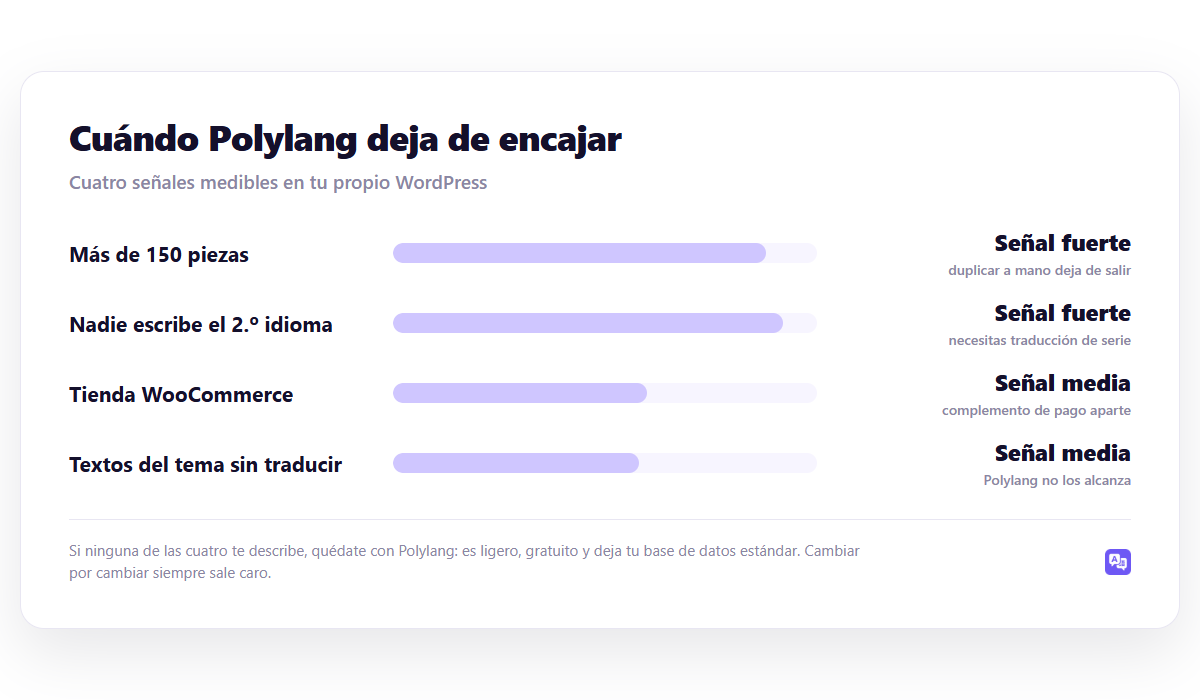
The four signs that you have fallen short
They are not opinions: they are measured in your own WordPress.
1. You have more than 150 pieces. Count posts, pages and products. With Polylang, everyone needs their hand-created twin per language. After a certain number, the work stops working no matter how good the tool is.
2. Nobody writes the second language. Polylang Pro connects to DeepL, but with tu API key: you open an account, pay your bill, monitor consumption. And yet you translate piece by piece.
3. You sell with WooCommerce. You need a separate paid add-on, which works fine but is another license and another renewal.
4. The texts of the topic continue in Spanish. Polylang translates your content, not the theme strings or those from other plugins. For that it is necessary Loco Translate: another tool and another flow.
If none of the four describe you, stick with Polylang. Seriously: it's lightweight, free, and leaves your standard database behind. Change for the sake of change is always expensive.
Quick comparison
| Plugin | Free | Price | It only translates | Facilities |
|---|---|---|---|---|
| Polylang | Yes, unlimited languages | 99 € per year | No (DeepL with you API) | 800.000 |
| WPML | No | 39 / 99 / 199 € per year | Yes, for separate credits | Not published |
| TranslatePress | Yes, 1 language | 99 / 199 € per year | Yes, bag of words | 400.000 |
| GTranslate | Yes, on the fly | Monthly subscription | Yes, without saving in the free | 900.000 |
| Weglot | Trial | By words | Yes, on your server | 50.000 |
| WP-Translate | Yes | 89 / 169 / 289 € one-time payment | Yes, the entire site at once | Recent |
1. WPML, if the problem is management
The natural alternative when you grow up. Where Polylang gives you the structure, WPML adds the manager: you send jobs in batches, you distribute them among translators or agencies, each piece goes through review states, and when you edit the original it marks the translation as outdated.
Where it fits: WooCommerce stores (included from the CMS plan), teams with translators, websites with many unusual third-party plugins.
Where not: There is no free version, the initial configuration is dense and automatic translation is charged for separate credits.
The direct comparison is in WPML vs Polylang.
2. TranslatePress, if the problem is loose texts
If what's wrong is that the menu, theme buttons and plugin notices stay in Spanish, TranslatePress attacks just that: you translate on the page itself, by clicking on any visible text.
Where it fits: themes with a lot of layout, forms, stores with distributed texts.
Where not: The free version only allows one language in addition to the original – less generous than Polylang in this – and with three hundred entries, translating by looking at each page is a long job.
In TranslatePress vs Polylang there is the detail, and the options if it doesn't fit either, in alternativas a TranslatePress.
3. Weglot, if you don't want to maintain anything
It translates and hosts on its servers, serving versions in subdomains or subdirectories. Sets up in minutes and works great.
Where it fits: teams that prefer to pay not to deal with it.
Where not: the price goes up with words and languages, and your translations don't live in your database. If you stop paying, they leave. We compare it in Weglot vs WPML.
It is the alternative that is furthest from the Polylang philosophy, precisely in what Polylang does well: that everything is yours and standard.
4. GTranslate, only if SEO doesn't matter
In its free mode it translates on the fly in the browser and doesn't save anything: There is no URL per language with its own content, so you will not position yourself in any new market. It is used to help a foreign visitor understand your website, not to get new visitors.
If you come from Polylang, this is a step back from everything you cared about. Developed in GTranslate vs WPML.
Ojo: When comparing prices, look at the renovation. Polylang is the exception in the sector: it renews at 50%, so for three years it is €198 compared to €297 for TranslatePress or the WPML CMS plan. If price is your reason for leaving Polylang, check that the alternative is actually cheaper after three years, not just the first.
5. WP-Translate, if the problem is volume
It is the direct alternative to the specific limitation of Polylang: that translating is a job that someone has to do piece by piece.
WP-Translate launches the translation of the entire site at once and marks each piece as pending review. You then correct what really sells —the pricing page, product sheets— and the rest works in the meantime.
What changes compared to Polylang:
- Various AI engines included. You do not open a DeepL account or manage API keys or monitor consumption.
- Also translate theme strings and plugins, so you don't need separate Loco Translate.
- One-time payment from €89, €169 or €289 depending on the number of sites, with a lifetime license, instead of annual renewal.
- WooCommerce included, without added payment supplement.
What no changes: Polylang is still better if each language on your website has different handwritten content, or if you especially care that your database remains pure WordPress. You can compare with the free version on your own website.
Advice: Before changing, try one thing with what you already have: Automatically translate your five pages that bring the most traffic and look at the result. If quality is worth it, your problem is volume and the solution is mass translation. If it doesn't work for you, your problem is quality and you need someone writing — and then Polylang is already useful for you.
How to choose
- Who is going to write? If no one, you need a serial translation. It is the question that decides and the only one that does not change over time.
- How many pieces do you have? Count and multiply by languages. Below fifty, almost anyone will do.
- Where do your translations want to live? Yours or an external service.
- How much does it cost in three years? Not to one.
The complete tour, in the guide WordPress multilanguage.
Frequently asked questions
Can I migrate from Polylang to another plugin?
There is a tool for WPML and it works reasonably well. In any case, count on checking slugs, menus and internal links: they almost never survive intact. The safe procedure is in how to migrate without losing translations, and it is worth the same in this sense.
Is free Polylang useful for a professional website?
Yes, if you write each language. It falls short when you want to translate URL slugs or duplicate content between languages: that's Pro.
Can I add automatic translation to Polylang?
With Polylang Pro and your own DeepL key, yes. It's still piece by piece, so it resolves the quality but not the volume.
What is the lightest alternative?
None is lighter than Polylang: using the native taxonomy adds less machinery than any other. If your main criterion is performance, don't change. We measure it in Does a translation plugin slow down your website?.
Continue reading
This piece is part of the guide WordPress multilanguage, where the complete tour is: URL structure, plugin choice, automatic translation, SEO and budget.
- WPML vs TranslatePress — the manager against the visual editor
- alternativas a TranslatePress — 6 real options with prices of 2026
- GTranslate vs WPML — on-the-fly translation versus saved translation